JSON Translation Source
You can load translations from a .json asset using JsonTranslationSource component.
Note
JavaScript Object Notation, or JSON, is a popular file format for storing data.
JSON Format
Here is an example JSON that contains translations for "title", "back" and "content" phrases in English, Spanish and Chinese. { "title": { "English": "Import from JSON files", "Spanish": "Importar desde archivos JSON", "Chinese": "从JSON文件导入", }, "back": { "English": "Back", "Spanish": "atrás", "Chinese": "背部", }, "content": { "English": "This translated text comes from a JSON file.", "Spanish": "Este texto traducido proviene de un archivo JSON.", "Chinese": "此翻译的文本来自JSON文件。", } }
You can split your translations into multiple documents. How you want to split your translations is up to you. I recommend splitting your translations in two ways to keep each file from growing too large and becoming unmanagable:
- Group phrases logically and include each group in a separate file. For example phrases in your game would be split into these groups: main menu phrases, level1 phrases, level2 phrases, new year online event phrases, etc.
- Include translations for each language in a separate file. This way the translators for each language work in their isolated file and won't accidentally mess up translations for other langauges.
How to Use the JSON Translation Source in Unity
To use JsonTranslationSource in a scene:
- Add a new GameObject to your scene.
- Add a JsonTranslationSource component.
- Set the "Text Asset" field to the .json file that contains the translations.
- To load the translations in Editor, press the "reload" button in the inspector.
If things work correctly, you should be able to see the translations from your JSON file in the inspector window for the JsonTranslationSource component.
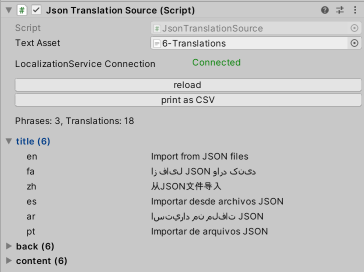
The status of the last load will be shown in Inspector for the JsonTranslationSource component. If there is an error there will be an info box with the error in the inspector along with a console error message.

See Also
- Read the Getting Started page to see
No Such Localizationin action.