Standalone Translation Source
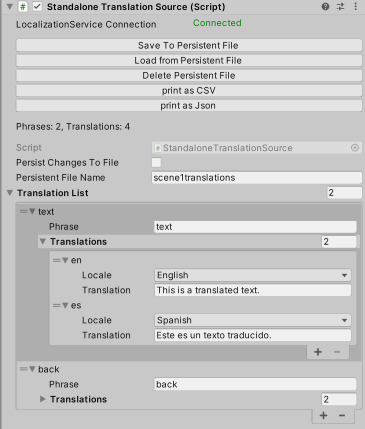
You can embed translations directly in a Unity scene using StandaloneTranslationSource component.
Changing Translations at Runtime
This translation source let's you modify the translations programmatically at runtime. While usually the translations are fixed, this may be useful in case you want to make dynamic phrases and translations.
The "Persist Changes to File" and "Persistent File Name" fields define where the changed data should be stored. The data file is created under Application.PersistentDataPath.
Setup Unity to Use the Public Google Sheet
To use StandaloneTranslationSource:
- Add a new GameObject to your scene.
- Add a StandaloneTranslationSource component.
- Add entries to "Translation List" field. (See screenshot above)
See Also
- Read the Getting Started page to see
No Such Localizationin action.