Overview
Basics
No Such Studio: Localization consists of three categories of components.
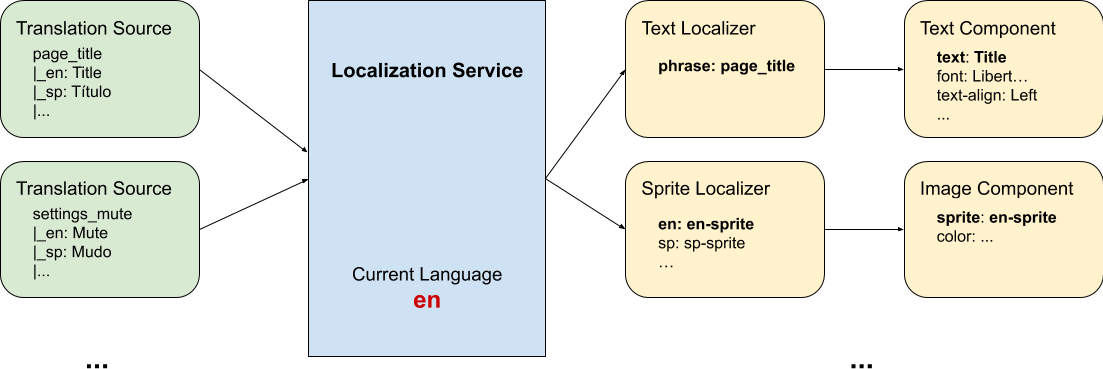
1) Localization Service Instance
LocalizationService acts as the central hub for the localization framework. There must be a single instance of this component in the scene. We recommend marking the GameObject DontDestroyOnLoad. If there are multiple instances of this script, the one that gets enabled last will act as the registered and active instance.
Other components that participate in the localization process register with this service instance and are able to change the current language, listen to localization events and publish events.
2) Component Localizers
Component Localizers (which subclass ComponentLocalizer<LT, CT>) are components that make changes to other components based on the localization service's current language and translations and their own custom logic. There are different localizers for different components. Here are a few common localizers:
- Text Localizer: Changes the text of a Text UI component based on a phrase and the current language.
- Image Sprite Mapped Localizer: Changes the sprite of an Image UI component based on the current language.
Most localizer components change only a single field of their target component. This way they can be mixed and matched to create more complex Localization behaviours. For Text Mesh Pro UI component, there are the following built-in localizers:
- TMPro Text Localizer: Changes the text of a Text Mesh Pro UI component based on a phrase and the current language.
- TMPro Font Localizer: Changes the font of a Text Mesh Pro UI component based on the current language.
- TMPro Align Localizer: Changes the text alignment field of a Text Mesh Pro UI component based on the current language.
3) Translation Sources
Translation Source components (usually subclass BaseTranslationSource ) provide translations to the Localization Service. In contrast to Localizer components, they don't listen nor react to the events of Localization Service such as a language change.
Structure of Components in a Scene
You can have as many translation sources and localizers as you need in your scene. Any component that is active and enabled seamlessly works with the Localization Service instance in the scene. Since both translation sources and localizers are regular Unity components, you can save them in prefabs and reuse them in multiple scenes or load them dynamically.
You can organize translation sources depending on your needs:
- Distributed on individual GameObjects in your scene.
- Centeralized in a single source in your scene
- One source per translated language
- etc.
It really depends on you, your game and your team. The architecture is flexible and gives you the options.
See Also
Read the Getting Started page to see No Such Studio: Localization in action.
See Translation Sources to get familiar with Translation Source components.
Watch our youtube tutorials.
Read the Extend No Such Localization page to see how you can create your own custom components.